

If you have not heard of bit.ly I’m sure you have seen a bit.ly link around somewhere. Bit.ly is a URL shortening service that allows you to take large URL like this: http://www.thinkcomputers.org/kingston-mobilelite-g2-usb-card-reader-with-8gb-sdhc-card-review/ and turn it into something like this: http://bit.ly/6IBH75. So what is the reason to shorten a URL? URL shortening makes it easier to remember URL’s, but I really never used a URL shortening service until twitter. With Twitter you only get 140 characters to send your message so why would you want most of your message to be a URL? That’s where URL shortening comes in, to cut that long URL down so you have more room to explain what you are linking to.
There are tons of URL shortening services out there, but why do I use bit.ly? When I first really started using URL shortening services I mainly used HootSuite’s ow.ly URL shortener, which I did like very much. It has stats tracking and everything, but there was a problem. When you would go to an ow.ly link there was a toolbar at the top of the page. This really did not bother me at first, but when I was listening to a podcast someone said that when they see a toolbar at the top when clicking on a shortened URL they immediately would close the page, no matter what it was. I thought if one person thought that way there has to be more people like that as well. So I was looking for a new URL shortening service and I found bit.ly.
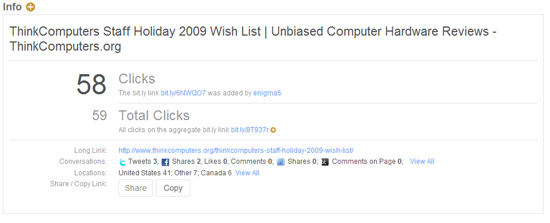
Bit.ly is very simple and easy to use. You can easily goto their website and create a short URL, but bit.ly also has an API so it is built into many Twitter applications and Twitter actually uses it as their official URL shortener. You do not need a bit.ly account to use bit.ly, but if you want to track clicks you will have to create one. Once you have an account every bit.ly link you create with your account is tracked. When you login to bit.ly it will list all of the short URL’s that you have created. Beside each link you will be able to share the link, copy the link, check the info on the link and delete the link.
When you click on each link to that a look at the info for the link it will give you all the information you would want to know about the link including a graph of clicks, referrers, and locations.
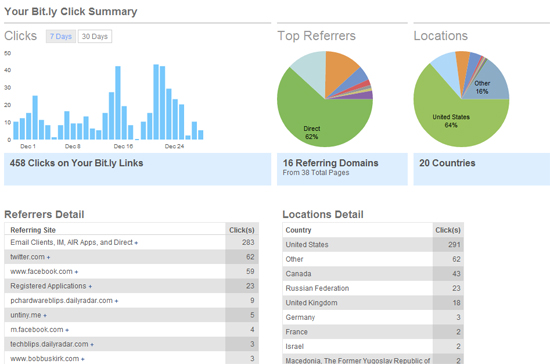
Another great thing to check out is your Bit.ly click summary. It will show summary graphs of all of your clicks for the past 7 or 30 days. This is great because it shows what days get the most clicks, your referrers, and the locations of where the clicks are coming from. This gives you an outlook on where your traffic is coming from and when to best post content.
If you are looking for a new URL shortening service then check out Bit.ly.
3 Comments
Kristina
December 31, 2009 at 12:40 amThanks for the recommendation. Will have to try it out for some of my affiliate products!
Ruben@OurBlogLog
January 10, 2010 at 9:29 pmBit.ly dominated the market this year , Its crazy.
textbook buyback
August 11, 2011 at 6:19 pmYes, I’ve heard of them, but I just read and found out they have about a million users. That is an impressive number! And an even more impressive server — I don’t think I’ve ever used their service and had it be slow. It’s funny all the times I’ve used their service, I didn’t even notice the big “sign up” button so until I read your article just now, I didn’t even know you could get an account and track the clicks! Learn something new every day — that’s why I’ve bookmarked your blog! Thanks!!