
I’m really not big on paid apps, but if there is one that I think is worth the money I will buy it and check it out. I was looking through my friends Flickr page and noticed a few photos titled ColorSplash and they were black and white with single objects colored in. I noticed that the photos were taken with an iPhone so I decided to lookup ColorSplash. After reading some reviews it seemed like a cool app. I found it on the iTunes store for $1.99, I figured what the hell and I bought it.
What ColorSpash allows you to do is take any of your stored photos and converts them to black and white. Then you can easily select sections of the photo to go back into color. This is really cool and makes some great photos. The interface is really easy to use, just open the app and select a photo. At the bottom of the interface you can select between color and gray. If you select color you can go ahead and start reclaiming sections of the photo you like by drawing with your finger. If you mess up there is an undo button at the top or you can just select grey at the bottom and you can fix the problem.
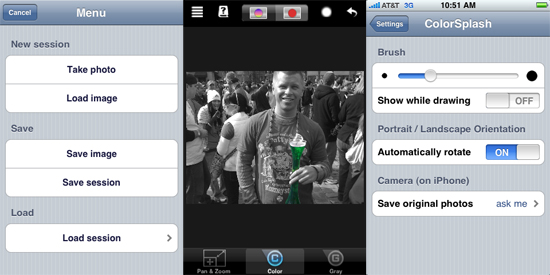
One thing I noticed when I first started using the app was that my brush size was way too big. To change this you need to exit the app and go into the iPhone settings. Towards the bottom you will find a ColorSpash menu. Once inside there you can change the brush size and change a few other settings. Here are some of the photos I’ve used ColorSplash on.

Most of these only took about 5 minutes to make. As you keep on using the app you will get better at it too. If you want to see the full size versions of these photos check out my Flickr page. For $1.99 this app is definitely worth it!